New ChatGPT - New Game
 About a year ago, I wrote a game. At that time, it was version 3.5 and early version 4. A year has passed, and I asked ChatGPT to create another game for me. Behold...
Arrow Stand
Let me start with a brief list of the changes I’ve noticed:
- Big context makes a huge difference. Now the whole codebase (40 kilobytes) and game design document (5k) can be included in each request. Not only that, but all the lengthy replies fit in the context, and I never saw the 'Message too long' error. Previously, I had to be really careful about what to include.
- The model is really good and gives full code, not just changes. Combined with the previous point, it's a game changer. Now I send the whole codebase and documentation and get back file contents that can be copy/pasted. Previously, I had to carefully go through all the files making the suggested changes. It was a boring and error-prone process, which is gone now. The quality of the answers is extremely good, with almost no bugs introduced and no time wasted on debugging and fixing.
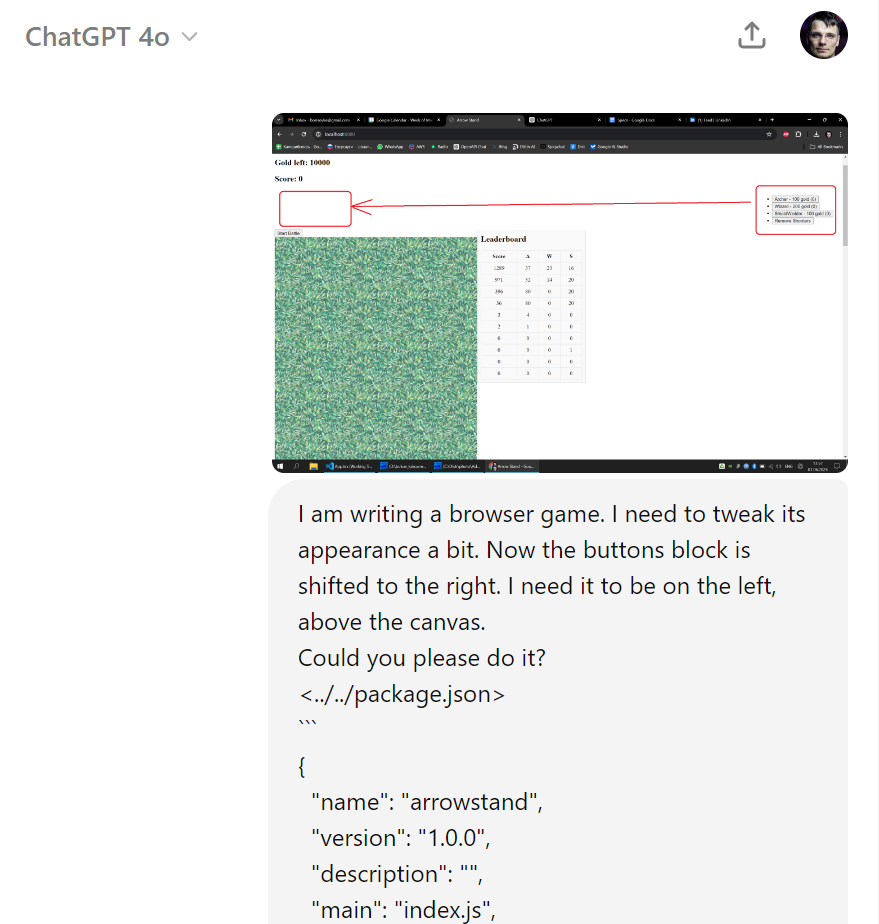
- Multimodal capabilities are useful. HTML/CSS design is still tricky with ChatGPT, but it's much easier now. You can send a screenshot, and the model will understand you perfectly:
- Experience with AIs helps. I use LLMs every day. I found it much easier to get good results than before. People talk about prompt engineering, but I think it's more important to build up product management skills. I understand ChatGPT's limitations and can split and simplify the functionality to better fit the tool. Just like in real life: you have to shape your requirements according to the resources you have.
You can generate graphics as well, though I found Midjourney gave much better results. Generating music and sounds was not a problem either (with suno.com), but I haven't figured out licensing and haven't included it in the game.
Let’s dive deeper now. Here is the chat with which I started the development: link The prompt I started with was:
I want to create a small browser game called "Arrow Stand". The gameplay is simple: there is some terrain with walls, motes and grass. A player can place some amount of arrow shooters on any place of the map. They stay fixed on the places. Then an attack begins. The attackers can't shoot and just attack the closest arrow shooter.
First I need you to expand the gameplay. Please do not add additional mechanics and just fill the gaps.
As a first step please ask me any questions about the gameplay to ensure everything is covered.
You can see how fast ChatGPT came up with a working prototype and gameplay and technical specs. BTW the specs are really important. Here is the final document after many updates: link. When close to the project completion I stopped updating the document and stopped to include it into prompts and that was a mistake! ChatGPT manages to understand the game logic based on the code, but quality of the responses is much higher when there is a separate text description of the end result.
Then I asked ChatGPT to create a script that copies all the source code into one file:
import osdef get_files_with_extension(directory, extensions, skip_dirs, skip_files): file_list = [] for root, dirs, files in os.walk(directory): # Skip directories that are in the skip_dirs list dirs[:] = [d for d in dirs if d not in skip_dirs]
<span style="color: #008800; font-weight: bold">for</span> <span style="color: #007020">file</span> <span style="color: #000000; font-weight: bold">in</span> files: <span style="color: #008800; font-weight: bold">if</span> <span style="color: #007020">file</span> <span style="color: #000000; font-weight: bold">in</span> skip_files: <span style="color: #008800; font-weight: bold">continue</span> <span style="color: #008800; font-weight: bold">if</span> <span style="color: #007020">any</span>(<span style="color: #007020">file</span><span style="color: #333333">.</span>lower()<span style="color: #333333">.</span>endswith(ext) <span style="color: #008800; font-weight: bold">for</span> ext <span style="color: #000000; font-weight: bold">in</span> extensions): file_list<span style="color: #333333">.</span>append(os<span style="color: #333333">.</span>path<span style="color: #333333">.</span>join(root, <span style="color: #007020">file</span>)) <span style="color: #008800; font-weight: bold">return</span> file_listdef extract_content_and_write_to_log(file_list): with open('output.log', 'w', encoding='utf-8') as output_file: for file_path in file_list: with open(file_path, 'r', encoding='utf-8') as input_file: content = input_file.read() output_file.write(f"<{file_path}>\n
</span><span style="color: #666666; font-weight: bold; background-color: #fff0f0">\n</span><span style="background-color: #fff0f0">{content}</span><span style="color: #666666; font-weight: bold; background-color: #fff0f0">\n</span><span style="background-color: #fff0f0">\n")if name == "main": target_directory = "../../" # Replace this with the path to your target directory extensions = ['.ts', '.tsx', '.js', '.json', '.html', '.css'] skip_dirs = ['node_modules', '.git', 'dist'] # Add any directories you want to skip here skip_files = ['package-lock.json'] # Add any files you want to skip here
files_to_process <span style="color: #333333">=</span> get_files_with_extension(target_directory, extensions, skip_dirs, skip_files) extract_content_and_write_to_log(files_to_process)
<filename1>
```
<file content1>
```

<filename2>
```
<file content2>
```
I included such files as package.json and tsconfig.json, because ChatGPT helped me configure those as well. And each of my prompts included all the source code and gameplay specs (many thanks to the big context). It makes the chats hard to read because it is a lot of text, but the results were impressive. All my “prompt engineering” was to shoot everything I had and ask, “What should I implement next?”. Here is an example: link.
At an early stage, I asked ChatGPT to split the game logic into several files: link. With this, it was much easier to copy/paste results from ChatGPT to the source code. ChatGPT generated a full file content with the name in the first line, and I just replaced the whole file.
From time to time, I asked ChatGPT to refactor the code. A year ago, each refactoring was a problem. With ChatGPT-4, it’s just one request. Here, I asked it to extract config into a separate file and then to implement area damage for wizards: link. Two significant changes with just two requests. Really easy!
And that is my general impression of the new ChatGPT. I just make a request and get a result. Here, I asked to make the spiders avoid stepping on each other. It is a significant behavior change, but it was done easily: link. Another example is the winning logic. Initially, the spiders always won; all the defenders were dead at some point, the only difference was the number of spiders killed. My son didn’t like this, so I changed the logic to reach 2000 points to win: link.
I spent about 30 hours building this game, which is about 10% of the effort I would have had to put in if I did the same project myself (I’m neither a game nor a web programmer). ChatGPT opens the door to implementing your pet project. It is now not just a helper but a powerful software development tool. I strongly encourage you to try it yourself to get a taste of new opportunities and to build up your AI usage expertise.
Have fun!