Amazon Rekognition .NET Core Tutorial

Used a photo by kazuend on Unsplash
I put code for this tutorial to GitHub and I would like to recommend it to download it and run to see it with your own eyes.
First you need to set up your AWS credentials. I store the credentials in environment variables:
 In .Net Core those settings are stored in Properties\launchSettings.json. Please make sure this file is safe and your credentials are not exposed through your repository on other way:
{
  "profiles": {
    "DetectFaces": {
      "commandName": "Project",
      "environmentVariables": {
        "AWS_SECRET_ACCESS_KEY": "XXXXXXXXXXXXXXXXXXXXXXXXXXXXXXXXXXXXXX",
        "AWS_ACCESS_KEY_ID": "XXXXXXXXXXXXXXXXXXXXXXXXXXXX"
      }
    }
  }
}
Then we need to connect to AWS Rekognition engine. We use AmazonRekognitionClient which is the Amazon.Rekognition namespace. You need to add AWSSDK.Rekognition in the NuGet Package Manager to have access for it. And don’t forget using Amazon.Rekognition.Model to get access to all the model classes.
var awsAccessKeyId = Environment.GetEnvironmentVariable("AWS_ACCESS_KEY_ID");
var awsSecretAccessKey = Environment.GetEnvironmentVariable("AWS_SECRET_ACCESS_KEY");
_amazonRekognitionClient = new AmazonRekognitionClient(awsAccessKeyId, awsSecretAccessKey, RegionEndpoint.EUWest2);
- Asia Pacific (Mumbai)
- Europe (London)
- Europe (Ireland)
- Asia Pacific (Seoul)
- Asia Pacific (Tokyo)
- Asia Pacific (Singapore)
- Asia Pacific (Sydney)
- Europe (Frankfurt)
- US East (N. Virginia)
- US East (Ohio)
- US West (N. California)
- US West (Oregon)
Before we can call AWS we need to represent our image as an array of bytes. Image can be converted to bytes with JpegBitmapEncoder and MemoryStream, but you might use any other way, reading a file to a buffer for example:
byte[] data;
JpegBitmapEncoder encoder = new JpegBitmapEncoder();
encoder.Frames.Add(BitmapFrame.Create(CurrentImage));
using (MemoryStream ms = new MemoryStream())
{
    encoder.Save(ms);
    data = ms.ToArray();
}
When we have the image bytes the call is simplicity itself:
var request = new DetectFacesRequest { Image = new Amazon.Rekognition.Model.Image() { Bytes = source }, Attributes = new List<string> { "ALL" } };
var response = await _amazonRekognitionClient.DetectFacesAsync(request);
this.faceDetails = response.FaceDetails;
{ "FaceDetails": [ { "AgeRange": { "High": 33, "Low": 21 }, "Beard": { "Confidence": 93.551346, "Value": true }, "BoundingBox": { "Height": 0.5318261, "Left": 0.38189748, "Top": 0.08973662, "Width": 0.30684954 }, "Confidence": 100.0, "Emotions": [ { "Confidence": 0.8001142, "Type": { "Value": "ANGRY" } }, { "Confidence": 86.822525, "Type": { "Value": "CALM" } }, { "Confidence": 1.8258944, "Type": { "Value": "SURPRISED" } }, { "Confidence": 1.0853829, "Type": { "Value": "HAPPY" } }, { "Confidence": 3.3511856, "Type": { "Value": "SAD" } }, { "Confidence": 0.12456241, "Type": { "Value": "DISGUSTED" } }, { "Confidence": 5.7627077, "Type": { "Value": "CONFUSED" } }, { "Confidence": 0.22763538, "Type": { "Value": "FEAR" } } ], "Eyeglasses": { "Confidence": 97.766525, "Value": false }, "EyesOpen": { "Confidence": 92.13934, "Value": true }, "Gender": { "Confidence": 99.02347, "Value": { "Value": "Male" } }, "Landmarks": [ { "Type": { "Value": "eyeLeft" }, "X": 0.4398567, "Y": 0.26566792 }, { "Type": { "Value": "eyeRight" }, "X": 0.57429, "Y": 0.26926404 }, { "Type": { "Value": "mouthLeft" }, "X": 0.44999045, "Y": 0.4615153 }, { "Type": { "Value": "mouthRight" }, "X": 0.5613504, "Y": 0.46461004 }, { "Type": { "Value": "nose" }, "X": 0.50196356, "Y": 0.37576458 }, { "Type": { "Value": "leftEyeBrowLeft" }, "X": 0.3901617, "Y": 0.21878067 }, { "Type": { "Value": "leftEyeBrowRight" }, "X": 0.46625593, "Y": 0.2105012 }, { "Type": { "Value": "leftEyeBrowUp" }, "X": 0.42817318, "Y": 0.19923115 }, { "Type": { "Value": "rightEyeBrowLeft" }, "X": 0.54525125, "Y": 0.21237388 }, { "Type": { "Value": "rightEyeBrowRight" }, "X": 0.62924606, "Y": 0.22454414 }, { "Type": { "Value": "rightEyeBrowUp" }, "X": 0.5863404, "Y": 0.20254561 }, { "Type": { "Value": "leftEyeLeft" }, "X": 0.41776064, "Y": 0.26350778 }, { "Type": { "Value": "leftEyeRight" }, "X": 0.4667122, "Y": 0.26807654 }, { "Type": { "Value": "leftEyeUp" }, "X": 0.4400822, "Y": 0.25660035 }, { "Type": { "Value": "leftEyeDown" }, "X": 0.44101533, "Y": 0.27413929 }, { "Type": { "Value": "rightEyeLeft" }, "X": 0.5465879, "Y": 0.27004254 }, { "Type": { "Value": "rightEyeRight" }, "X": 0.5967773, "Y": 0.26796222 }, { "Type": { "Value": "rightEyeUp" }, "X": 0.5728472, "Y": 0.25988844 }, { "Type": { "Value": "rightEyeDown" }, "X": 0.5719394, "Y": 0.27742136 }, { "Type": { "Value": "noseLeft" }, "X": 0.47886324, "Y": 0.39542776 }, { "Type": { "Value": "noseRight" }, "X": 0.52901316, "Y": 0.3946445 }, { "Type": { "Value": "mouthUp" }, "X": 0.50311553, "Y": 0.44111547 }, { "Type": { "Value": "mouthDown" }, "X": 0.5032443, "Y": 0.4982476 }, { "Type": { "Value": "leftPupil" }, "X": 0.4398567, "Y": 0.26566792 }, { "Type": { "Value": "rightPupil" }, "X": 0.57429, "Y": 0.26926404 }, { "Type": { "Value": "upperJawlineLeft" }, "X": 0.364641, "Y": 0.25789997 }, { "Type": { "Value": "midJawlineLeft" }, "X": 0.3910422, "Y": 0.46887168 }, { "Type": { "Value": "chinBottom" }, "X": 0.5044233, "Y": 0.5957734 }, { "Type": { "Value": "midJawlineRight" }, "X": 0.63242453, "Y": 0.47487956 }, { "Type": { "Value": "upperJawlineRight" }, "X": 0.6651306, "Y": 0.2652495 } ], "MouthOpen": { "Confidence": 95.07979, "Value": false }, "Mustache": { "Confidence": 80.48857, "Value": false }, "Pose": { "Pitch": -0.50104016, "Roll": -0.11814453, "Yaw": -0.8540245 }, "Quality": { "Brightness": 32.687115, "Sharpness": 94.08263 }, "Smile": { "Confidence": 98.75468, "Value": false }, "Sunglasses": { "Confidence": 98.83094, "Value": false } } ], "OrientationCorrection": null, "ResponseMetadata": { "RequestId": "1aec37d3-d585-4bc4-8d22-c045ced2f9cb", "Metadata": {} }, "ContentLength": 3345, "HttpStatusCode": 200 }
"Smile": {
    "Confidence": 98.75468,
    "Value": false
}
{
    "Confidence": 86.822525,
    "Type": {
        "Value": "CALM"
    }
}
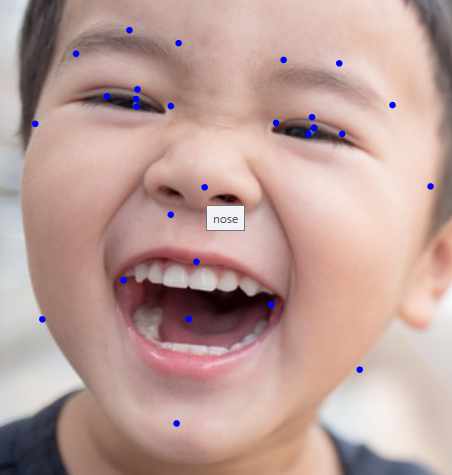
Besides that we have really usefull list of face features with their positions, which are returned in the faceDetail.Landmarks list.
"Landmarks": [
{
    "Type": {
        "Value": "eyeLeft"
    },
    "X": 0.4398567,
    "Y": 0.26566792
},
{
    "Type": {
        "Value": "eyeRight"
    },
    "X": 0.57429,
    "Y": 0.26926404
},
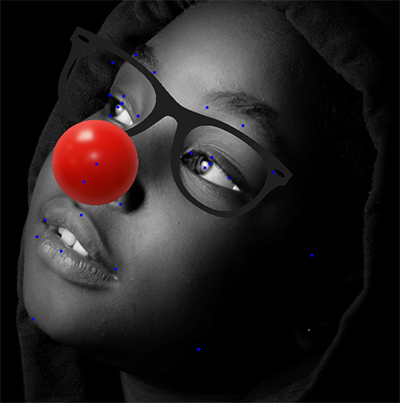
In my program I used positions of eyes and nose to place glasses and a clown nose on the picture in the right place and with the right scale. It comes out pretty good and works correctly even in complex cases when the head is tilted and rotated in 3D:
Used a photo by Wadi Lissa on Unsplash