Lambda functions as a serverless backend, C# tutorial

Photo by Natalia Y on Unsplash
Code for this tutorial is available in GitHub, so feel free to download it and check the two projects: WebConjugacion is an Angular client working with Lambda backend and LambdaConjugacion is the backend itself.
In our application the main service returns 10 random Spanish verb forms and we implemented that by using JSON file and simple Angular service. Here we are going to move it to C# implementation and use AWS to encapsulate this code in a form which can be consumed by the Angular application.
public class Data { private static List<WordViewModel> Verbs { get; } static Data() { var verbString = File.ReadAllText("verbsForLambda.json"); Verbs = JsonConvert.DeserializeObject<List<WordViewModel>>(verbString);} </span><span style="color:#569CD6;">public</span><span style="color:#D4D4D4;"> </span><span style="color:#569CD6;">static</span><span style="color:#D4D4D4;"> </span><span style="color:#4EC9B0;">List</span><span style="color:#D4D4D4;"><</span><span style="color:#4EC9B0;">WordViewModel</span><span style="color:#D4D4D4;">> </span><span style="color:#DCDCAA;">TenRandomVerbs</span><span style="color:#D4D4D4;">(</span><span style="color:#569CD6;">string</span><span style="color:#D4D4D4;">[] </span><span style="color:#9CDCFE;">tenseKeys</span><span style="color:#D4D4D4;">) { </span><span style="color:#569CD6;">var</span><span style="color:#D4D4D4;"> </span><span style="color:#9CDCFE;">rnd</span><span style="color:#D4D4D4;"> = </span><span style="color:#569CD6;">new</span><span style="color:#D4D4D4;"> </span><span style="color:#4EC9B0;">Random</span><span style="color:#D4D4D4;">(); </span><span style="color:#569CD6;">var</span><span style="color:#D4D4D4;"> </span><span style="color:#9CDCFE;">allWordsModels</span><span style="color:#D4D4D4;"> = </span><span style="color:#9CDCFE;">Data</span><span style="color:#D4D4D4;">.</span><span style="color:#9CDCFE;">Verbs</span><span style="color:#D4D4D4;"> </span><span style="color:#6A9955;">// Filter for the selected tenses only</span><span style="color:#D4D4D4;"> .</span><span style="color:#DCDCAA;">Where</span><span style="color:#D4D4D4;">(</span><span style="color:#9CDCFE;">w</span><span style="color:#D4D4D4;"> => </span><span style="color:#9CDCFE;">tenseKeys</span><span style="color:#D4D4D4;"> == </span><span style="color:#569CD6;">null</span><span style="color:#D4D4D4;"> || </span><span style="color:#9CDCFE;">tenseKeys</span><span style="color:#D4D4D4;">.</span><span style="color:#9CDCFE;">Length</span><span style="color:#D4D4D4;"> == </span><span style="color:#B5CEA8;">0</span><span style="color:#D4D4D4;"> || </span><span style="color:#6A9955;">// Include all verbs if nothing is selected</span><span style="color:#D4D4D4;"> </span><span style="color:#9CDCFE;">tenseKeys</span><span style="color:#D4D4D4;">.</span><span style="color:#DCDCAA;">Contains</span><span style="color:#D4D4D4;">(</span><span style="color:#9CDCFE;">w</span><span style="color:#D4D4D4;">.</span><span style="color:#9CDCFE;">tense_key</span><span style="color:#D4D4D4;">)) </span><span style="color:#6A9955;">// Shuffle</span><span style="color:#D4D4D4;"> .</span><span style="color:#DCDCAA;">OrderBy</span><span style="color:#D4D4D4;">(</span><span style="color:#9CDCFE;">o</span><span style="color:#D4D4D4;"> => </span><span style="color:#9CDCFE;">rnd</span><span style="color:#D4D4D4;">.</span><span style="color:#DCDCAA;">NextDouble</span><span style="color:#D4D4D4;">()) .</span><span style="color:#DCDCAA;">Take</span><span style="color:#D4D4D4;">(</span><span style="color:#B5CEA8;">10</span><span style="color:#D4D4D4;">) .</span><span style="color:#DCDCAA;">ToList</span><span style="color:#D4D4D4;">(); </span><span style="color:#569CD6;">var</span><span style="color:#D4D4D4;"> </span><span style="color:#9CDCFE;">words</span><span style="color:#D4D4D4;"> = </span><span style="color:#9CDCFE;">allWordsModels</span><span style="color:#D4D4D4;">; </span><span style="color:#C586C0;">return</span><span style="color:#D4D4D4;"> </span><span style="color:#9CDCFE;">words</span><span style="color:#D4D4D4;">; } }
Amazon provides a project template named “AWS Lambda Project with Tests (.NET Core - C#)” which is really easy to use. It contains a method FunctionHandler which we will update. We don’t want our service to be stateless, so we will pass a string with tenses selected by user and we will return an object which contains 10 random items. Our method will consume the business logic we just created:
public object FunctionHandler(string filter, ILambdaContext context)
{
    return Data.TenRandomVerbs(string.IsNullOrEmpty(filter) ? null : filter.Split(","));
}
Now we can publish this function as a new Lambda GetRandomVerbs, but in its current state it is not accessible as a web service. To convert it to an API we need to use API Gateway.
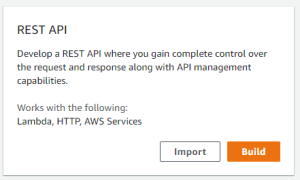
In API Gateway there are 2 options available: REST API and HTTP API. You can check differences between theme here, but in short REST API is more flexible in configuration, but slower, and HTTP will give you more speed, but less options. I will show you both options starting with the classic REST API.
 After the API is created we need to add a GET action. Actions -> Create Method, select GET from the dropdown and save. In the Setup we need to select integration type (Lambda Function), region, function name (autocomplete is available) and click Save.
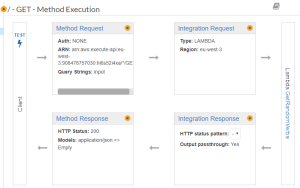 We will get default pipeline, but since we need to pass a parameter, we need to slightly modify it. In the Method Request block we need to add a parameter “input” and I prefer to have it in query string:

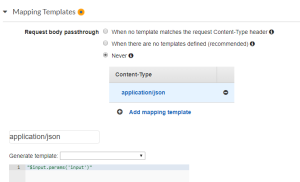
And in the Integration Request block we pass this parameter to our Lambda with Mapping Template option. In more complex cases we have JSON there, but since our parameter is a string the template is really simple:
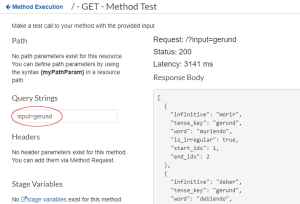
And now you can click Test, set input=gerund as a sample query string and get correct result:
Now you can deploy this API, you will be asked to create a stage (I named my stage “test”) and you will have an URL to call your Lambda through any browser. The URL contains id of your API, region and stage name (https://hi5s52i4xb.execute-api.eu-west-2.amazonaws.com/test/?input=gerund). You can add query parameters and get results.
But if you try this call in the Angular code, you will get an error in the Dev Console and nothing more. Why? Because we host our Angular application on S3 and we make call to an API Gateway and those are two different domains and security policies won’t allow us to simply make the call.
We need to use CORS headers (Cross-origin resource sharing). API Gateway allows to do this pretty easily. We need to go to our API and choose Action->Enable CORS. In the Access-Control-Allow-Origin we need to specify allowed domains, but by default there is ‘*’ there which allows call from any domain. I will keep it this way.
And that’s it! We can put this URL to our Angular client and see it working!
st string filterParameterKey = "input"; public APIGatewayProxyResponse Get( APIGatewayProxyRequest request, ILambdaContext context) { string filter = null; if (request.QueryStringParameters.ContainsKey(filterParameterKey)) { filter = request.QueryStringParameters[filterParameterKey];} </span><span style="color:#569CD6;">var</span><span style="color:#D4D4D4;"> </span><span style="color:#9CDCFE;">result</span><span style="color:#D4D4D4;"> = </span><span style="color:#569CD6;">this</span><span style="color:#D4D4D4;">.</span><span style="color:#DCDCAA;">GetTenVerbs</span><span style="color:#D4D4D4;">(</span><span style="color:#9CDCFE;">filter</span><span style="color:#D4D4D4;">); </span><span style="color:#C586C0;">return</span><span style="color:#D4D4D4;"> </span><span style="color:#DCDCAA;">CreateResponse</span><span style="color:#D4D4D4;">(</span><span style="color:#9CDCFE;">result</span><span style="color:#D4D4D4;">);}
APIGatewayProxyResponse CreateResponse(List<WordViewModel> result) { int statusCode = (result != null) ? (int)HttpStatusCode.OK : (int)HttpStatusCode.InternalServerError;</span><span style="color:#569CD6;">string</span><span style="color:#D4D4D4;"> </span><span style="color:#9CDCFE;">body</span><span style="color:#D4D4D4;"> = (</span><span style="color:#9CDCFE;">result</span><span style="color:#D4D4D4;"> != </span><span style="color:#569CD6;">null</span><span style="color:#D4D4D4;">) ? </span><span style="color:#9CDCFE;">JsonConvert</span><span style="color:#D4D4D4;">.</span><span style="color:#DCDCAA;">SerializeObject</span><span style="color:#D4D4D4;">(</span><span style="color:#9CDCFE;">result</span><span style="color:#D4D4D4;">) : </span><span style="color:#9CDCFE;">string</span><span style="color:#D4D4D4;">.</span><span style="color:#9CDCFE;">Empty</span><span style="color:#D4D4D4;">; </span><span style="color:#569CD6;">var</span><span style="color:#D4D4D4;"> </span><span style="color:#9CDCFE;">response</span><span style="color:#D4D4D4;"> = </span><span style="color:#569CD6;">new</span><span style="color:#D4D4D4;"> </span><span style="color:#4EC9B0;">APIGatewayProxyResponse</span><span style="color:#D4D4D4;"> { </span><span style="color:#9CDCFE;">StatusCode</span><span style="color:#D4D4D4;"> = </span><span style="color:#9CDCFE;">statusCode</span><span style="color:#D4D4D4;">, </span><span style="color:#9CDCFE;">Body</span><span style="color:#D4D4D4;"> = </span><span style="color:#9CDCFE;">body</span><span style="color:#D4D4D4;">, </span><span style="color:#9CDCFE;">Headers</span><span style="color:#D4D4D4;"> = </span><span style="color:#569CD6;">new</span><span style="color:#D4D4D4;"> </span><span style="color:#4EC9B0;">Dictionary</span><span style="color:#D4D4D4;"><</span><span style="color:#569CD6;">string</span><span style="color:#D4D4D4;">, </span><span style="color:#569CD6;">string</span><span style="color:#D4D4D4;">>{ {
"Content-Type", "application/json" }, { "Access-Control-Allow-Origin", "*" } } };</span><span style="color:#C586C0;">return</span><span style="color:#D4D4D4;"> </span><span style="color:#9CDCFE;">response</span><span style="color:#D4D4D4;">;}
After publishing this new Lambda, we need to create an HTTP API in the API Gateway which is pretty straightforward:
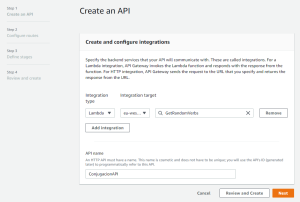
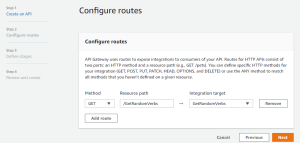
But it won’t work until you give execution rights explicitly:
aws lambda add-permission --function-name arn:aws:lambda:eu-west-3:908478757030:function:GetRandomVerbs --source-arn arn:aws:execute-api:eu-west-3:908478757030:pt2vedqyte/* --principal apigateway.amazonaws.com --statement-id statement-id-guid --action lambda:InvokeFunction
Now your gateway can call your Lambda. You can take the invocation url, add the route for your lambda, query parameters, and get result from browser:
https://pt1vedqzte.execute-api.eu-west-3.amazonaws.com/test/GetRandomVerbs?input=gerund
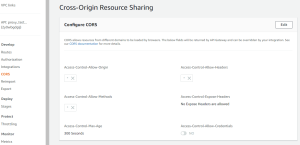
But to get things running, you need to configure CORS at the Gateway. I allowed everything filling the fields with ‘*’s:
 And here you go. We have now both REST API and HTTP API for our application.